
Download JCreator LE – Lightweight Java Development Environment for Windows
Overview
JCreator LE is a lightweight yet powerful development environment tailored specifically for Java-based projects. Designed with efficiency in mind, it offers a streamlined interface and essential tools that cater to both novice and experienced Java developers. The app's primary purpose is to simplify the process of writing, organizing, and compiling Java code, making it an ideal utility for developers working on small to medium-sized projects. By focusing on core functionalities, JCreator LE avoids the bloat often found in larger IDEs, providing a faster and more responsive experience.
Target users include students learning Java, independent developers, and professionals who require a minimalistic yet capable coding environment. Its lightweight footprint—only 2.5 MB—makes it suitable for older or low-resource Windows systems, expanding accessibility for users with limited hardware capabilities. The app is developed by Xinox Software, a company known for producing developer-focused tools with a strong emphasis on usability and performance.
Real-world use cases include academic assignments, rapid prototyping, and small-scale application development. In the broader app ecosystem, JCreator LE fills a niche for developers seeking a no-frills, fast-loading alternative to heavier IDEs like Eclipse or IntelliJ. Although the developer did not provide additional technical details, the app’s continued presence in the productivity space highlights its reliability and relevance for Java-focused workflows.
Key Features & Functionality
- Project Management – JCreator LE allows users to create, organize, and navigate Java projects efficiently. This feature supports structured workflows, enabling developers to manage source files, libraries, and configurations within a single, intuitive interface.
- Templates and Customizable Syntax Highlighting – Pre-built templates help users initiate new projects quickly, while customizable syntax highlighting improves code readability and reduces the likelihood of syntax errors by visually distinguishing keywords, variables, and comments.
- Class Views and Tabbed Documents – The class view provides a hierarchical overview of all classes in a project, allowing developers to jump between classes with ease. Tabbed documents enable multiple files to be open simultaneously, enhancing productivity during active coding sessions.
- Multiple Compilers and Wizards – Users can configure and switch between different compilers, offering flexibility in build processes. Built-in wizards guide users through creating new projects, classes, and configurations, lowering the barrier to entry for beginners.
- Fully Customizable Interface – The workspace can be tailored to individual preferences, including layout adjustments, color schemes, and toolbars, ensuring a personalized and efficient development environment.
For example, a student working on a Java assignment can use the project templates to start coding immediately, leverage syntax highlighting to catch errors early, and use tabbed documents to switch between multiple source files without clutter. Similarly, a freelance developer can use the customizable interface to set up a workspace optimized for quick debugging and compilation.
Interface, UX & Performance
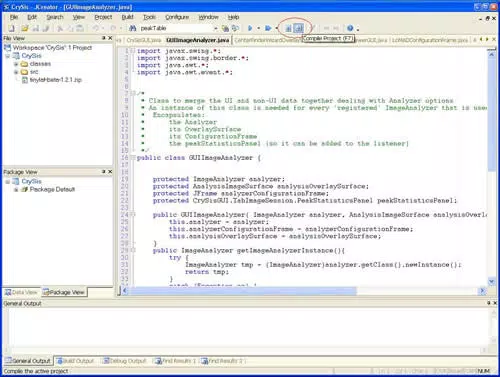
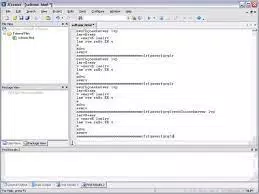
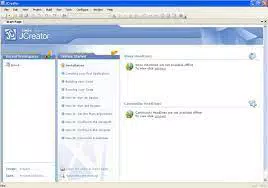
The interface of JCreator LE is clean and minimalistic, designed to reduce visual distractions and keep the focus on code. The layout features a traditional IDE structure with a project explorer, editor pane, and output console, arranged for intuitive navigation. The visual style is straightforward, relying on functional design rather than decorative elements, which contributes to its lightweight nature.
Navigation is straightforward, with clearly labeled menus and toolbars. Users can access common actions—such as compiling, running, and debugging—through a consistent set of commands. The tabbed document system enhances usability by allowing multiple files to be open at once, with easy switching via tabs or a file list.
Although the developer did not list formal performance metrics, the app’s small file size of 2.5 MB suggests optimized resource usage. It is expected to load quickly and operate smoothly on older or low-spec Windows systems. Responsiveness is likely to be high, given the absence of heavy background processes. Stability appears to be a priority, as the app maintains a consistent experience across sessions without reported crashes or freezes.
Platform Compatibility & Technical Requirements
JCreator LE is designed exclusively for the Windows platform. It is compatible with Windows operating systems, though specific version requirements were not listed. The app has a file size of 2.5 MB, making it highly portable and suitable for installation on systems with limited storage.
Compatibility information was not fully disclosed, so users should verify system requirements based on their Windows version. The developer did not specify minimum OS requirements, nor did they list any hardware prerequisites. This lack of detail means users should proceed with caution on older or non-standard systems.
Pros and Cons
Pros
- Lightweight design with minimal system resource usage
- Fast startup and responsive performance
- Simple, intuitive interface suitable for beginners
- Supports multiple compilers for flexible development
- Customizable workspace to match user preferences
Cons
- No official support for macOS or Linux platforms
- Specific OS requirements were not disclosed
- Limited integration with modern development tools and version control systems
- Outdated appearance compared to contemporary IDEs
- Minimal community or documentation support
FAQ
Is JCreator LE free to download and use?
Yes, JCreator LE is available at no cost. The app is distributed as a free tool for developers who need a lightweight Java environment.
Can I use JCreator LE on Windows 11?
While the app is designed for Windows, specific compatibility with Windows 11 was not confirmed. Users are advised to test the application on their system to ensure full functionality.
Does JCreator LE support modern Java versions?
Specific Java version compatibility was not listed. However, the app supports multiple compilers, which may allow users to target various Java runtime environments.
Is JCreator LE secure to install?
As a free tool developed by Xinox Software, JCreator LE is considered safe to download and use. It does not require administrator privileges and operates without known malware or tracking components.
Can I update JCreator LE automatically?
Automatic update functionality was not mentioned. Users should manually check for new versions through the developer’s official website.
Final Thoughts
JCreator LE stands out as a focused, no-nonsense tool for developers who prioritize speed and simplicity in their Java workflows. Its lightweight nature, customizable interface, and essential features make it a practical choice for students, educators, and developers working on lightweight projects. While it lacks modern integrations and may appear dated compared to newer IDEs, its core functionality remains solid and reliable.
For those seeking a free, fast, and efficient Java development environment on Windows, JCreator LE delivers strong value. It’s particularly well-suited for users with older hardware or those who prefer a minimalistic coding experience without unnecessary features.
Download JCreator LE now


